Takes
≈ 3 h→2 h of speech in 2:39
Retake cleanup by script
Recognises speech right on your computer, matches it to the script and keeps one good take for every line.
MarkFlow builds a rough cut of your episode in Premiere Pro from your script: it cleans up retakes, downloads and places inserts, and processes the sound. No AI guesswork, just rules and scripts, so it is fast.
Requires Windows and Premiere Pro. The script lives in Google Docs, the footage in Google Drive.
MarkFlow times come from the log of a real run; «by hand» is an editor's estimate.
The rough cut of a real episode built by MarkFlow, clip for clip. The host is already cut to the script, inserts sit under their lines, captions are in place. From here, you edit.
All of them install from one installer and work together or on their own.
Recognises speech right on your computer, matches it to the script and keeps one good take for every line.
Takes the links from the script, downloads the videos from YouTube, Instagram, TikTok and VK, trims them and places each under the right line of the host.
Voice, inserts, music and sound effects get your processing straight away, from your project template.
Reads the channel's finished projects and builds the rough cut the way you edit.
Tell Claude what to build, and it runs MarkFlow and reports back on the result.
Install the skillMarkFlow does not invent processing, it repeats yours. Here is a chain from a real project that it sets up on its own.
| Track | Processing |
|---|---|
| Voice | Parametric EQ — cut below 47 Hz, +3.8 dB on the highs Multiband Compressor — Broadcast preset, +2 dB DeNoise |
| Inserts | Hard Limiter — True Peak, −3 dB, input +2 dB |
| Music | Parametric EQ — mid dip at 800 Hz, −12.4 dB Hard Limiter — −22 dB, input −9 dB |
| SFX | Hard Limiter — −3 dB |
| Master | Hard Limiter — −1 dB, input +1 dB |
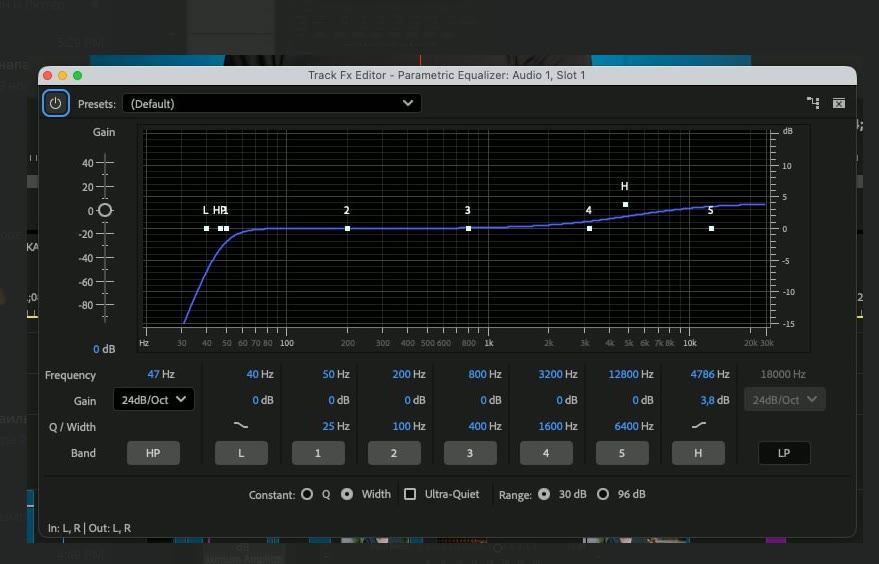
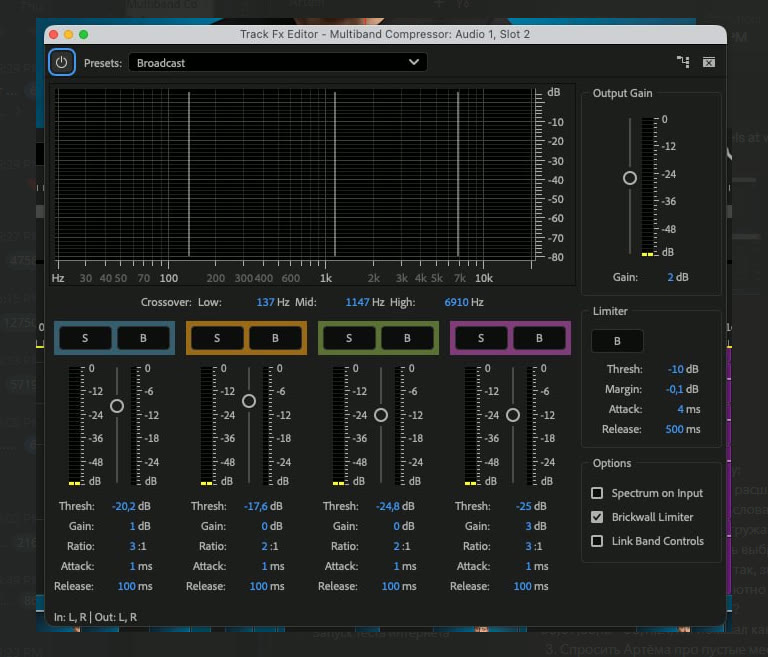
Settings from Premiere Pro, screenshots of the effect windows.
MarkFlow Hub installs the modules in a couple of clicks, brings updates on its own and lets you try everything for free.
From install to rough cut in one evening, instead of a full working day on every episode.
Install MarkFlow Hub and the modules you need. The free trial starts on its own.
Paste the link to the script in Google Docs and to the footage folder in Google Drive.
Click «Build rough cut» and open the finished project: everything is on the tracks, ready to edit.